linea flowEarly access

From raw data to a live dashboard, in one prompt.

Describe what you want. The assistant connects your data, builds a pipeline of notebooks you can open and edit, and puts a shareable dashboard on top.

  • Claude or Gemini
  • Runs on your machine
  • Every step versioned
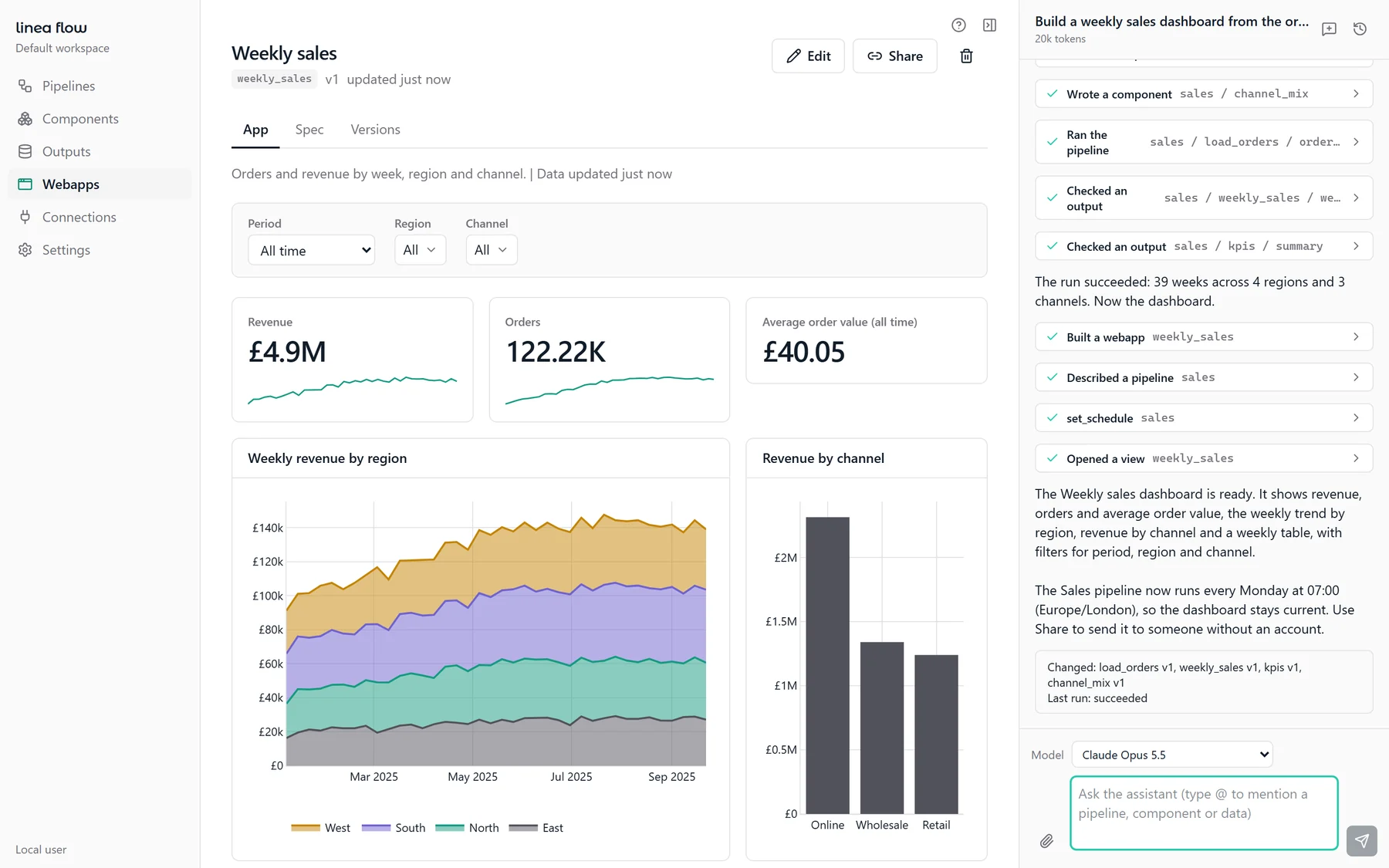
A weekly sales dashboard in Linea Flow, next to the assistant chat that built it

What is Linea Flow?

An AI analyst that shows its work

Ask in plain English

Describe the analysis or dashboard you need

Built from notebooks

Every step is a notebook you can open and edit

Always current

Pipelines run on a schedule in your time zone

Share by link

Send a dashboard to anyone, no account needed

How it works

From a CSV file to a shared dashboard in one prompt

orders.csv

Build a weekly sales dashboard from the orders file: revenue and orders by region and channel, the weekly trend, and filters for period, region and channel. Refresh it every Monday morning.

1
Bring your data

Drop a CSV, Excel or Parquet file into the chat, or connect a database, API or Google source.

2
Describe the outcome

Say what you want to see and how often it should refresh. Type @ to point at existing pipelines or tables.

3
Watch it build

The assistant inspects the data, writes each step, runs the pipeline, checks the outputs and builds the dashboard.

4
Use it, or look inside

Filter, edit and share the dashboard. Open any step's code, runs and versions, change it and rerun.

Why use Linea Flow?

Fast like a chatbot, transparent like a notebook

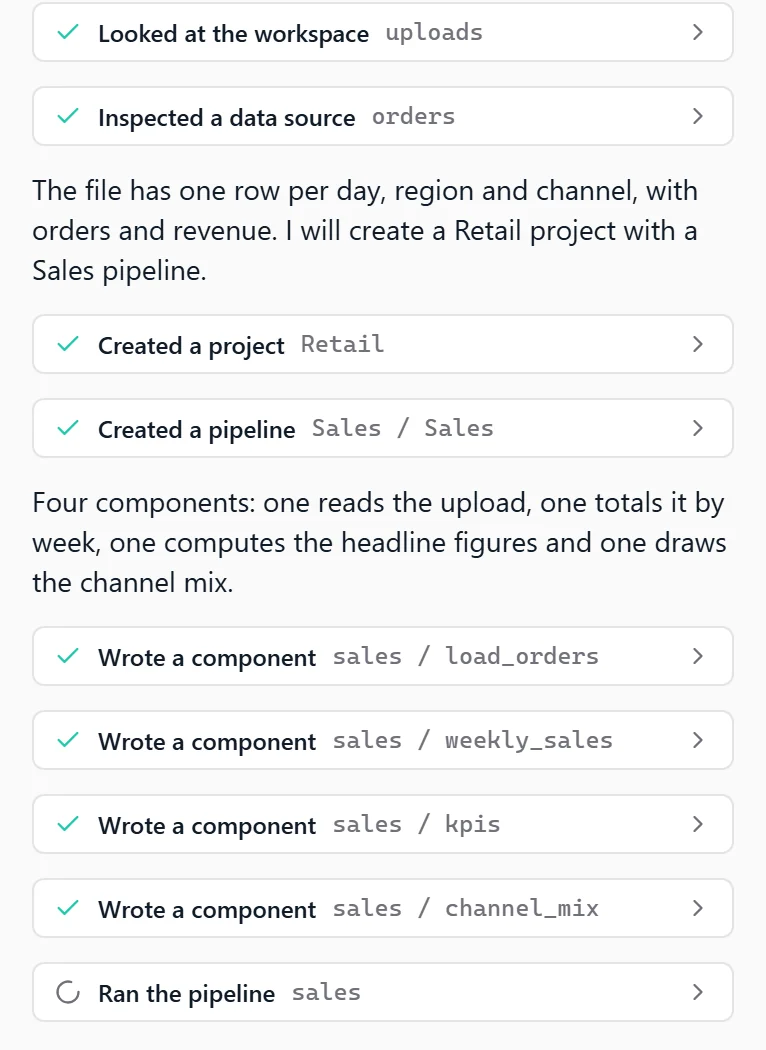
The assistant's action cards while it builds a sales pipeline

An assistant that does the work, and shows it

The assistant plans, writes, runs and repairs your pipeline while you watch. Every action appears as a card you can click into, so you can follow along, stop it, or take over.

  • Reads the error and retries when a step fails
  • Uses your metric definitions from shared workspace notes
  • Ends with a summary built from what actually ran
  • Works with Anthropic Claude or Google Gemini

No black boxes

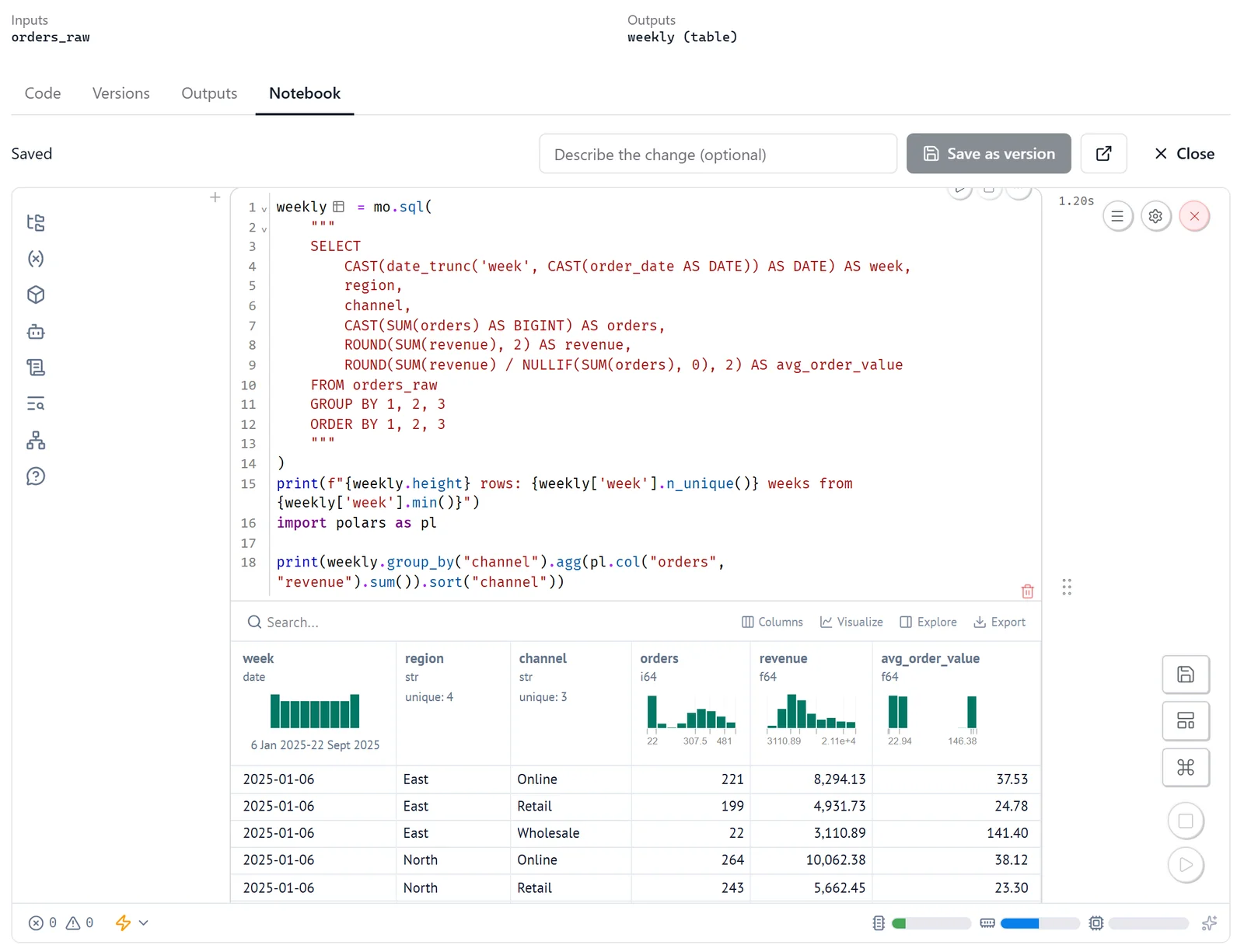
Every step is a small Python notebook with declared inputs and outputs. Open any step as a live marimo notebook with the real upstream data loaded, change it, and save it as a new version.

  • Python and DuckDB SQL, with polars, pandas, statsmodels and scikit-learn
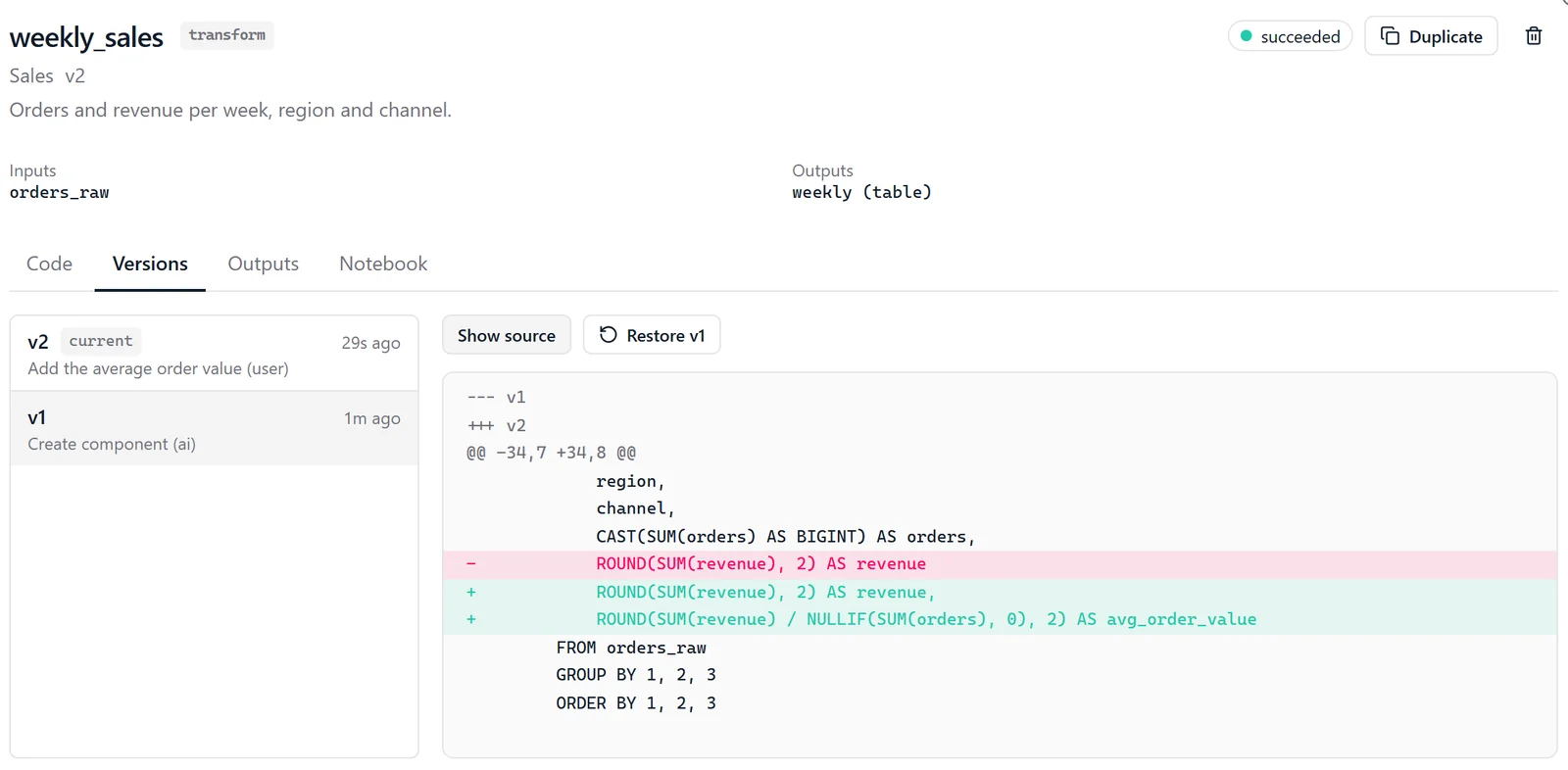
  • Every change is a version you can compare and restore
  • Every run records exactly which versions it used
A pipeline step open as a live marimo notebook with its data loaded
A version diff of a pipeline step, with a restore button
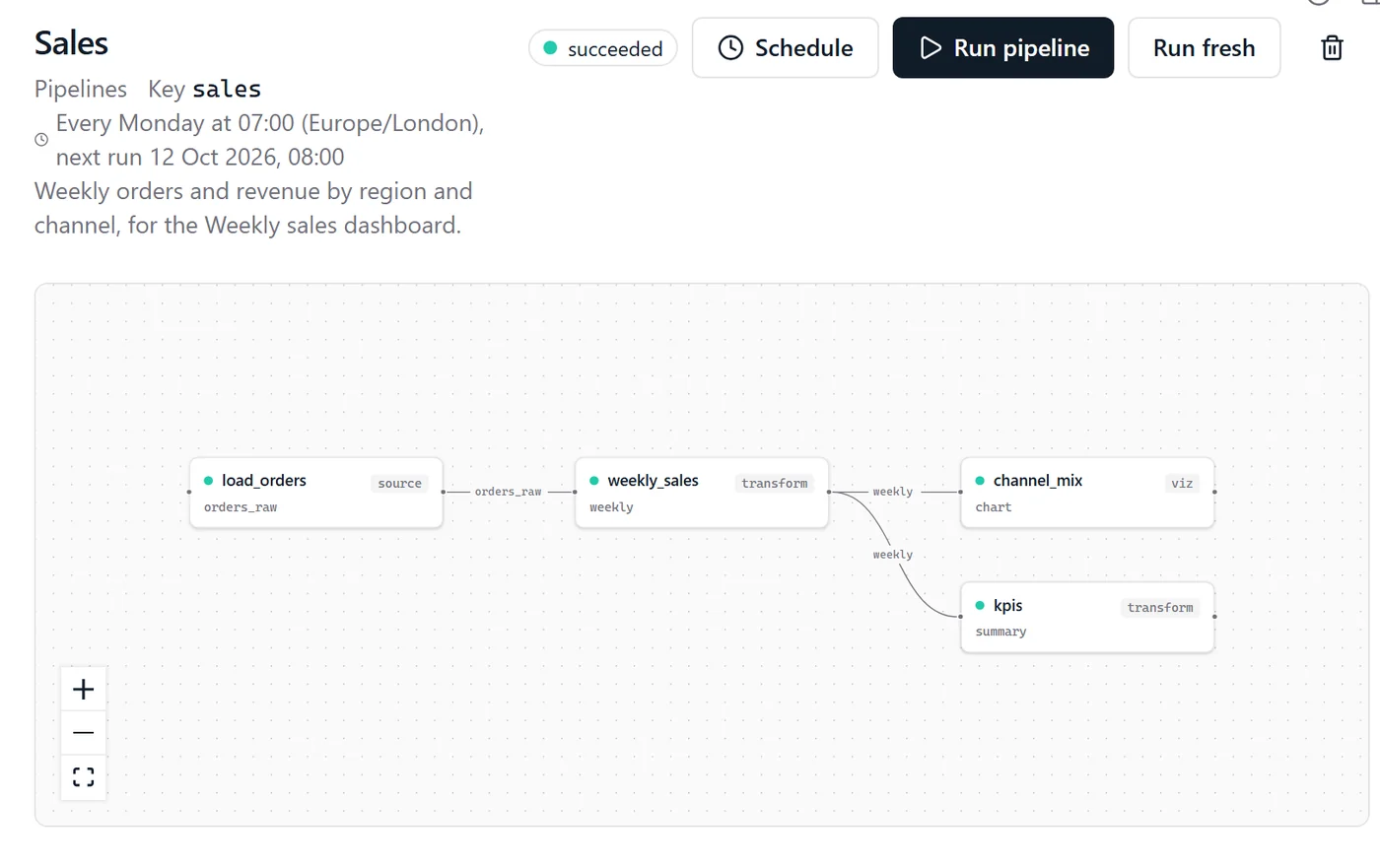
A pipeline graph of four steps, scheduled every Monday at 07:00

Pipelines that keep themselves current

The pipeline graph draws itself from what each step reads and writes. You never draw arrows. Set a schedule once and your numbers stay up to date.

  • Hourly, daily, weekly, monthly or custom schedules, in your time zone
  • Independent steps run in parallel; unchanged steps come from cache
  • A failure turns only that step red, with its logs one click away

Dashboards anyone can open

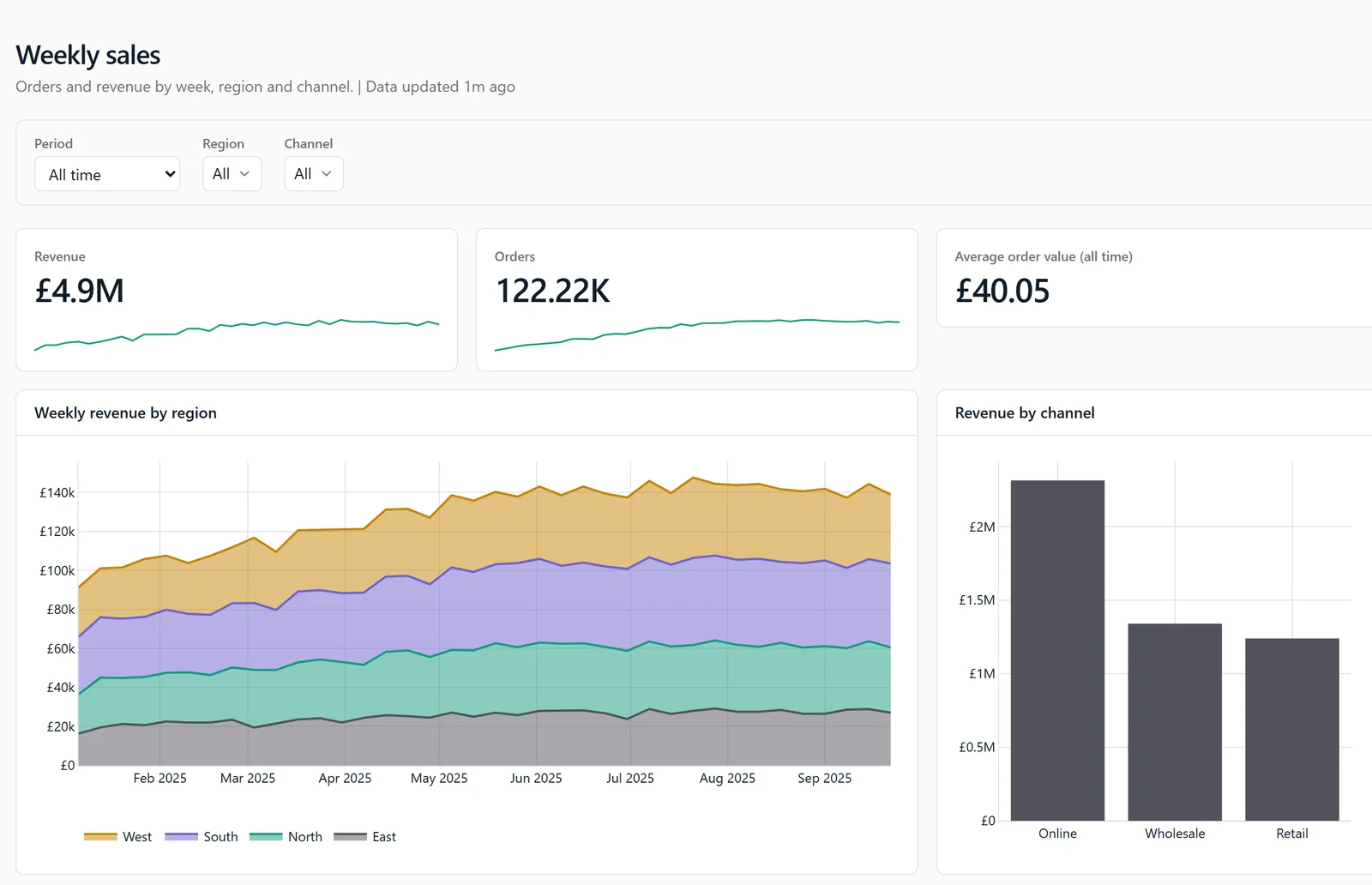
Turn outputs into dashboards with KPI tiles, charts, tables and filters, built by the assistant or in the visual builder. They refresh every time the pipeline runs.

  • Share a revocable link that shows one dashboard and only the data it uses
  • Viewers need no account
  • Need something bespoke? Write a custom HTML page on live pipeline data
A shared weekly sales dashboard as a visitor sees it

Connect to where your data lives

When the assistant needs a source you haven't connected yet, it shows the connection form right in the chat. Credentials go to the server, never to the assistant.

CSV, Excel & Parquet PostgreSQL BigQuery Google Sheets Google Analytics 4 Google Ads REST APIs

Your data stays yours

  • Runs on your own machine: no database server, no Docker and no cloud account needed
  • Only what you send to your chosen AI provider leaves your machine, and credentials never do
  • AI-written code runs in an isolated process per step, with an optional locked-down Docker executor
  • BigQuery queries carry a cost cap, and admins can cap AI token use
  • Export projects to Git as plain notebooks, with no data or secrets
Built by Linea Analytics

Made to answer your questions reliably and efficiently

Linea Flow breaks every request into small steps with clear inputs and outputs, so you can audit each one and see exactly where a number came from.

It reuses steps that have already been built and checked instead of starting from scratch, so new questions are answered faster and stay consistent with the answers you already have.

Try asking:

"Build a weekly sales dashboard by region and channel, refreshed every Monday."
"Put our media spend next to revenue by week."
"The revenue in this pipeline should be net of refunds."

Frequently Asked Questions

Do I need to know how to code?

No. You can build, change and share pipelines by asking the assistant. Every step is still plain Python and SQL, so analysts who do code can open, edit and version any of it.

Where does my data go?

Linea Flow stores everything locally. The only thing that leaves your machine is what you send to the AI provider you choose, and your credentials never do. They are stored encrypted and never enter the assistant's context.

Which AI models does it use?

Anthropic Claude or Google Gemini, with your own API key. You pick the model per chat, and admins can set token limits per user, per model and per period.

Can I trust what the assistant built?

Nothing it makes is hidden. Every step is a notebook with a declared contract, every run keeps its outputs, and every change is a new version you can compare and restore. The summary at the end of each chat is built from what actually happened, not from the model's own account.

Is Linea Flow available now?

Linea Flow is in early access. The local, single-user edition is complete and tested; a hosted, multi-user edition is in progress. Book a call to get started.

How does it relate to Linea's marketing mix modelling?

Linea Flow is a general analytics tool: it builds the pipelines and dashboards around your data. It is part of the LEAD Platform, alongside the MMM Platform. Marketing mix modelling itself is a separate Linea service, available as Always-on MMM or In-house MMM.

Take control of your data

Contact us

Have any project on mind?
For immediate support:

info@linea-analytics.com
Schedule a Call
Why wait

Your next dashboard is one prompt away.